Why admin panels end up as the support burden
Every SaaS product has two interfaces. The one customers see in the demo gets a designer, a research round and a launch. The other one, where administrators invite users, change permissions, fix billing and clean up data, gets built by whichever engineer needed it first, with whatever table component was already in the codebase.
Admin panel design is where that second interface stops being an afterthought. It matters because the people using it are the ones who decide whether a customer renews: the administrator who could not work out why a colleague had no access, the operations lead who exported everything to a spreadsheet because the filter did not do what they needed, the support agent who spends an hour a day doing by hand what a bulk action should have done.
None of those people appear in the product demo, and all of them appear in the support queue.
Who actually uses an admin panel
Start by naming the users, because there are usually more of them than the brief admits. A customer admin sets up the account and manages seats. An operations user works a queue inside it every day. Your own support team uses an internal version to fix things on a customer's behalf. Each of them has a different job, a different level of access and a different tolerance for density.

Nielsen Norman Group describes complex applications as tools for highly trained users with broad, nonlinear goals, and one of its guidelines for them is to reduce clutter without reducing capability. That is the admin panel problem exactly. The operations user needs forty controls because the job has forty controls. The customer admin, who opens the panel twice a month, needs to find the one control they came for.
On a two-sided home-care platform the operational side was a scheduling board, clinical records, credentialing and payouts, and the starting complaint was that nobody could say who was covering a client on Thursday without opening three systems. That is an admin panel problem, and it is a design problem, not a database one.
Design the table first
Most of an admin panel is tables, so the table is where the design effort pays back first. NN/g's research on data tables names four tasks a table has to support, and they make a better brief than any list of columns.
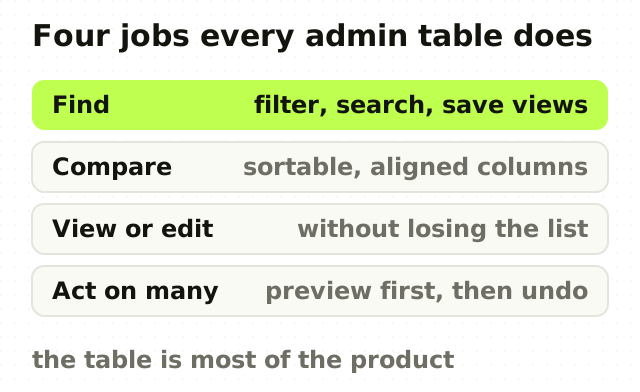
- Find records. Filters that match how people describe what they are looking for, saved views for the searches someone runs every morning, and a search box that searches the fields people actually know.
- Compare. Column order, alignment and density that let an eye run down a column. Numbers right-aligned, units in the header, no truncation on the field people compare by.
- View or edit one. A side panel rather than a new page, so the list stays in view and the person does not lose their place.
- Act on many. Selection, a count of what is selected, and actions that sit where the selection is.
If a table does these four well, most of the admin panel is already good. If it does them badly, no amount of styling on the rest will help.
Permissions are interface, not backend
The most common admin support ticket is some version of "why can't I do this?". The answer usually lives in a permission rule the person cannot see.
Design permissions as something visible. A disabled button should say why it is disabled and who can change it. A role should be described by what it lets someone do, not just by its name. An administrator changing a role should see who that change affects before it saves. And the product should be designed and tested while signed in as each role, because a screen that is clear for an owner can be a wall of greyed-out controls for a member.
Two roles with different permissions is a bigger design job than forty screens for one role. That is worth knowing before the admin panel is estimated.
Bulk actions need a preview and a way back
Bulk actions are where admin panels save the most time and cause the most damage. Deactivating two hundred users, reassigning a queue, changing a price for a segment: each is one click that can be very hard to undo.
Every bulk action should show what it will affect before it runs, in plain numbers: 214 users, 3 of them owners. It should run with visible progress for anything that takes more than a moment. It should report partial failure honestly, with the rows that failed and why, rather than a green banner over an incomplete job. And where the data allows, it should be reversible for a period, because the second most common admin ticket is "I did something to everyone by mistake".
The states nobody demos
Admin panels are built against clean test data and then used against real accounts. Design the states that only real accounts produce: the empty account on day one, the account with ten thousand rows, the record with a missing field, the import where row 37 of 500 failed, the user who can see a list but not open anything in it.
These are not edge cases for an admin panel. They are most of its use, which is the same argument I made about designing the empty state first, applied to the screens where the stakes are higher.
Build it or use an admin framework
Admin frameworks and component kits are a sensible starting point for an internal tool, and a poor finishing point for a customer-facing admin area. They give you tables, forms and filters quickly. They do not give you the decisions: which four tasks matter most, which permission model people can understand, which bulk actions need a preview.
The practical split is to use the kit for the components and design the workflows yourself. The same thinking applies to dashboards, where the decision a screen supports matters more than the chart it shows.
The point
An admin panel is where customers decide whether your product is easy to run, and it is almost never where the design budget goes. Start from the tasks administrators repeat, design the table around finding, comparing, editing and acting, make permissions visible, and give every bulk action a preview and a way back.
Do that and the admin panel stops being the support queue's favourite screen.
Frequently asked questions
- What makes a good admin panel design?
- A good admin panel is designed around the tasks administrators repeat, not around the database schema. It has tables that support finding, comparing, editing and acting on records, permissions that are visible and explained, bulk actions with a preview and a way to undo, and designed states for empty accounts, partial access and very large data sets.
- How do you design a data table for an admin panel?
- Design an admin data table around four tasks: finding records with filters and saved views, comparing values in consistent aligned columns, viewing or editing one record in a side panel that keeps the list visible, and acting on many records through selection and bulk actions. Nielsen Norman Group identifies these four as the main jobs tables support.
- Should an admin panel be built with a framework?
- An admin framework or component kit is a good way to get tables, forms and filters quickly, especially for internal tools. It does not make the design decisions for you. Use the kit for components, and design the workflows, permission model and bulk actions deliberately, particularly for admin areas that customers use.
- How do you show permissions in an admin interface?
- Show permissions as part of the interface. Explain why a control is disabled and who can change it, describe roles by what they allow rather than by their names alone, and show an administrator who a role change affects before it is saved. Test every screen while signed in as each role.
- How long does an admin panel redesign take?
- An admin panel redesign typically takes four to eight weeks of design work, driven mainly by how many distinct roles use it rather than by screen count. A single-role internal tool sits at the short end. A multi-role, customer-facing admin area with permissions and audit requirements sits at the long end.
Sources
This thinking, applied
Share this