The scaling problem appears after the redesign
A new SaaS homepage often looks excellent on launch day. Then the marketing calendar begins.
A product ships and needs a feature page. Sales asks for an industry page. Partnerships needs an integration page. Search wants comparison pages. A campaign needs a landing page by Friday. Pricing changes. A new product line arrives.
If every request starts with opening a design file and inventing a page, the website is not a system. It is a sequence of custom projects.
The opposite failure is a rigid template builder where every page is easy to publish because every page looks the same. That is operationally scalable and strategically weak.
The interesting problem is preserving a distinctive design language while making new pages cheap to assemble.
A component library multiplies whatever assumptions you put into it. If the ICP, category and message hierarchy are still changing every few weeks, a large website system makes the wrong assumptions reusable.
This is why the full system makes more sense once a repeated sales story exists. Before that, keep the site modular enough to change and avoid over-investing in dozens of section patterns tied to positioning that is still moving. The prerequisite is the same one that governs a redesign: lock the positioning first.
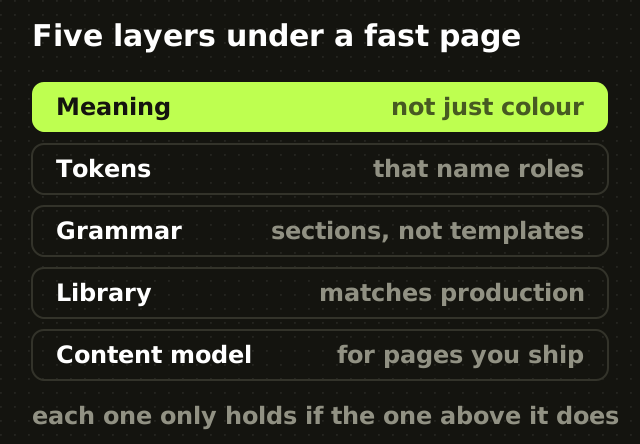
Layer one: encode meaning, not just colour
Most design systems start with colour. For an AI-assisted marketing site, start one layer earlier.
Document the constraints both humans and models need when generating a page. The primary ICP and secondary audiences. Category language and terms to avoid. Core value themes and proof hierarchy. Voice, with good and bad examples. Primary and secondary actions by page intent. Claims that require evidence or legal review. Competitors that may be named, and under what conditions. The distinct page jobs: feature, use case, comparison, integration, campaign, resource, pricing.
This prevents the most common AI website failure, which is structurally clean pages that say generic things in a generic order. It is the same mechanism that makes every AI startup website look the same.
Layer two: tokens that name roles
A scalable system encodes decisions as reusable roles. Use semantic names such as surface-primary, text-muted, border-subtle, space-section and radius-card rather than page-specific ones such as homepage-blue or hero-gap.
The more a token describes why a value exists, the easier it is for a person or a model to reuse it correctly. That argument is the whole of naming the decision rather than the colour, and it matters more with generation in the loop, because a model given only primitives will pick plausible ones inconsistently.
Layer three: a section grammar, not fifty templates
A B2B marketing site needs reusable sections, but reusable should not mean every feature page is hero, three cards, testimonial, call to action.
Design a controlled vocabulary of section types with meaningful variation. Orientation sections: hero or category statement, use-case framing, old-way contrast. Proof sections: customer logos with context, case-study outcome, annotated product evidence, security and integration proof. Explanation sections: workflow steps, feature mechanism, comparison, technical detail. Conversion sections: demo or trial, migration, a lower-intent resource path.
The creative work is defining enough variants that pages can express different stories while every variant still feels like the same company.
Think grammar, not template. A grammar gives you valid ways to combine parts. A template gives you one sentence with blanks.
Layer four: match the design library to production
If the design library and the codebase describe different systems, generation will eventually pick one and your team will spend time repairing the other.
Name components consistently. Align variants and tokens where practical. Document responsive behaviour. Avoid design-only variants engineering cannot support, and code-only escape hatches nobody can see in design.
The general lesson is bigger than any one tool: AI output improves when design intent and implementation constraints live in machine-readable project context rather than only in someone's head. Whether that context arrives through a repository file, a component library or an MCP server carrying design data into the editor, the requirement is the same.
Layer five: a content model for the pages you actually ship
A design system without a content system still creates bottlenecks.
For each page type, define structured fields and allowed modules. A feature page might require one primary buyer and problem, one product mechanism, one proof asset, related workflows, an FAQ only where real objections exist, and one primary action.
This can live in a CMS, a content collection or any structured publishing system. The implementation matters less than the contract: content should be editable without forcing marketers to break layout or duplicate components.
What belongs in the project instructions file
Claude Code reads a `CLAUDE.md` at the start of a session as persistent project instructions. Treat it like the onboarding brief you would give a capable developer joining the website team, and keep it operational rather than encyclopedic.
Include the repository architecture and where website content lives. Build, lint, test and visual-regression commands. Component and token conventions. Which existing components must be reused before creating new ones. Responsive and accessibility requirements. Content and metadata rules. Image rules and performance budgets. The validation sequence required after page changes. Then link to deeper design-system and editorial rules rather than copying them in.
The critical property is that these instructions are context, not an enforcement mechanism. A model reads them and is more likely to comply. It is not prevented from deviating. For anything that must hold, pair the instruction with an automated check: linting, type checks, component tests, accessibility tests, link validation, visual regression. On this site, for example, the rules about title and description length are written down and also enforced by a build guard, because only one of those two stops a mistake shipping.
A token list tells a model what values exist. Examples show it what good judgment looks like.
Keep a small set of approved sections and pages that represent the design language at its best. Document the recurring anti-patterns too: do not introduce new gradients unless the brand system supports them, do not create a new card style when an existing pattern can carry the content, do not default to a centred hero, do not put every benefit into a three-column grid, do not generate decorative imagery without product meaning, do not add animation without a purpose.
Undirected generation tends toward familiar aesthetics. Context, examples and a real design system are what pull it back toward your brand.
The page-generation workflow
Make generation cheap and approval deliberate.

- Start from the page job and the target intent.
- Select the primary ICP, competitive alternative and proof.
- Have the model propose an outline using only allowed section types.
- Review the story before generating layout or code.
- Build with existing components and tokens.
- Add only the assets the story requires.
- Run automated validation.
- Review visually at real breakpoints.
- Read it as a cold buyer: can I understand the claim, trust it, find the next action?
- Publish, measure, and feed repeated corrections back into the rules.
Step four is the one that matters. If the story is wrong, more generated fidelity makes the wrong page harder to abandon, which is the prototyping failure mode applied to marketing pages.
Governance and the blast radius
Good systems do not stay good by accident. Define who can add a token, create a component, add a section pattern, change a global content rule, or publish generated pages without design review.
For a small team this can be lightweight: one design owner, one engineering owner, a contribution checklist and a monthly review of exceptions. The goal is not bureaucracy. It is stopping one campaign deadline from becoming five permanent component variants.
The approval boundary should move with the blast radius. A typo on one feature page is local. A new token, a changed navigation model or an unsupported competitive claim propagates. I would not hand any agent unrestricted authority over positioning, legal comparisons, information architecture or new global components. It can draft and propose all of them.
The site needs guardrails for the things generation gets almost right. Accessibility against WCAG 2.2, including keyboard use, focus, semantic structure and alt text. Performance against Core Web Vitals, including image sizing, lazy loading and layout stability. Search hygiene: one h1, metadata, canonicals, internal links, sitemap and feed integration. Content rules banning unsupported claims. Visual regression on representative pages.
AI increases throughput. QA has to increase confidence, not review meetings.
The point
The scalable website is not the one where a model can generate the most pages. It is the one where every new page reuses proven decisions and makes deviations visible.
Build the meaning first. Encode the design language. Align design and code. Structure the content. Give the model concise project context. Automate the checks. Keep humans on the decisions with the largest blast radius.
That is how AI becomes leverage instead of entropy.
Frequently asked questions
- What makes a B2B website scalable?
- Five layers working together: documented positioning and content rules, semantic tokens, a controlled vocabulary of section types rather than fixed page templates, a structured content model, and explicit rules about what generation may change. Without them, every new page becomes either a custom design project or an identical template, and neither scales well.
- What should go in a CLAUDE.md for a website project?
- Repository architecture and where content lives, the build, lint and test commands, component and token conventions, which components must be reused before creating new ones, accessibility and responsive requirements, metadata rules, performance budgets and the validation sequence after page changes. Keep it operational and link out to deeper documents rather than copying them in.
- Can AI instructions replace automated checks?
- No. A project instructions file is context that makes compliance more likely; it does not prevent deviation. Anything that must hold should be paired with an automated check, such as linting, type checks, accessibility tests, link validation or visual regression, so a violation fails a build rather than relying on a reviewer noticing it.
- Should we build a design system before or after product-market fit?
- Generally after a repeated sales story exists. A component library multiplies whatever assumptions you encode, so building one around positioning that is still changing every few weeks makes the wrong assumptions reusable. Before that point, keep the site modular enough to change cheaply and avoid investing in dozens of section patterns.
Sources
This thinking, applied
Share this